

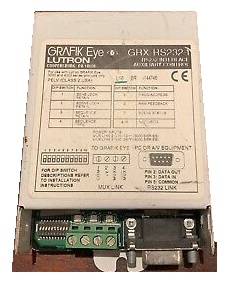

Description
Overview
Many projects with GRAFIK Eye lighting controls also have other equipment such as audio/visual and building
management systems that need to be integrated with the lighting controls. Today, most of this equipment has a
serial RS232 port that can be used to send and receive commands. For these applications, Lutron offers an
Interface Control (GRX-RS232) that provides direct communication with this equipment. The GRX-RS232 allows up
to eight 3000 or 4000 Series GRAFIK Eye Control Units to communicate with a personal computer or auxiliary
audio/visual equipment via RS232.
Features of the GRX-RS232
The GRX-RS232 can execute the following commands:
Select Scene – Select any scene on any GRAFIK Eye Control Unit.
Scene Lock – Prevent light level changes on GRAFIK Eye Control Unit(s).
Request Scene Status – Request the current scene of every GRAFIK Eye Control Unit in the system.
Sequence – Begin sequencing Scenes 1-4 or 5-16 (DIP Switch selectable) on selected GRAFIK Eye Control Units.
Zone Lock – Prevent permanent changes of preset zone levels on a GRAFIK Eye Control Unit(s).
Zone Raise/Lower – Raise/Lower any zone on any GRAFIK Eye Control Unit.
Additionally, the GRAFIK Eye RS232 Interface Control will allow a PC or auxiliary A/V equipment to monitor the
following information on a GRAFIK Eye System:
Raw Feedback – (DIP Switch 6 ON) Report button presses and releases on all GRAFIK Eye Control Units and Accessory Controls.
Scene Status – (DIP Switch 7 ON) Report scene changes on all GRAFIK Eye Control Units. Scene status may be
changed by Control Units, Accessory Controls, Sequences, or Timeclock (GRX-ATC).
Reviews
There are no reviews yet.